Rich Text
Rich text supports rendering multiple styles, colors, sizes, and formatting modes inside a single text object.
You can construct rich text manually from RichTextBlocks, or parse it from a lightweight HTML-like syntax using rich_text(str).
Parsing performs tokenization + style tree construction, so avoid reparsing every frame. Parse once and reuse the resulting RichText.
Quotes around argument values are optional as long as the value does not contain spaces (e.g. #abc).
<font size=50>
    This text is <font color=red3>red</font>,
    and this text is <font color=blue3>blue</font>

    <font color=#abc>
        You <font size=30>may make your</font> text any
    </font>

    <font color="rgb 1.0 1.0 1.0">
        color <hl color=slate9>you want</hl>
    </font>

    <font bold color="oklch 0.7 0.1184 119">
        Check the docume
    </font>
    <font italic color=blue2>
        ntation for
    </font>
    <b>rich_text()</b> for more.

    <i>
        Lorem <ol color=green5>ipsum dolor</ol>
        <ul>sit amet consectetur</ul>
        adipiscing elit.
    </i>

    <ul color=red5>
        You <st>can</st> nest
        <font color=red5 size=70 bold>styles</font>
        <noul>inside</noul>
        of eachother
    </ul>
</font>
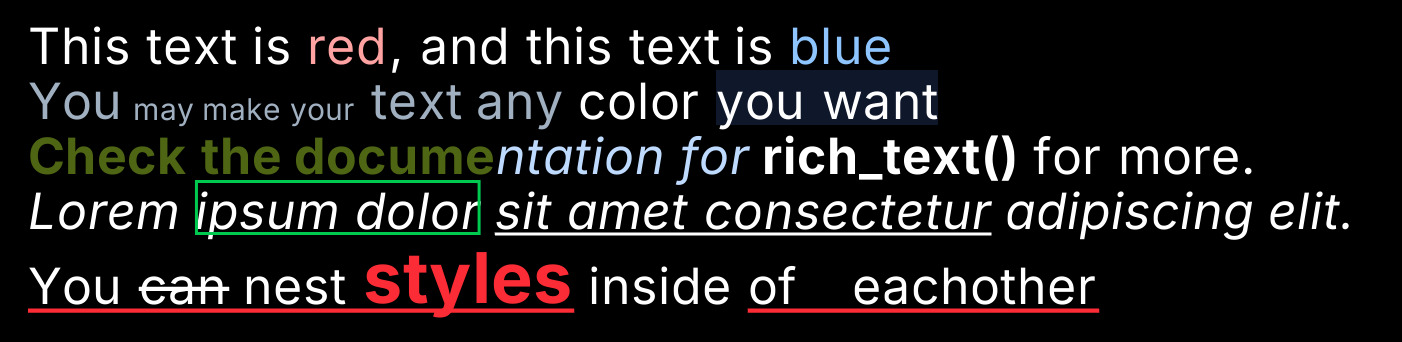
Rich text can be drawn with .draw or .draw_world, and the text will be
wrapped within the area provided, and printed to stdout (the terminal), with
most of the formatting applied.
| Tag | Information | Supported arguements |
|---|---|---|
| <b> <bold> <strong> | Makes the text inside of it | None |
| <i> <italic> <em> | Makes the text inside italic | None |
| <font> | More complex styling like font size | size, color, bold, italic, underline, strikethrough, outline highlight |
| <ul> <underline> | Specifies an underline for text inside | color |
| <st> <strikethrough> | Specifies strikethrough for text inside | color |
| <nost> <no-strikethrough> | Removes strikethrough for text inside | None |
| <hl> <highlight> <bg> | Specifies a background fill for the text inside | color |
| <nohl> <nobg> <no-highlight> | Removes highlight for text inside | None |
| <ol> <outline> | Specifies an outline around the text inside | color |
| <noul> <no-underline> | Removes underline for text inside | None |
Argument values can unquoted when the argument has no spaces.
<font color=red5>
<font color="#abc">
<font color="rgb 1.0 1.0 1.0">
Rich text can also be printed to stdout with .print_to_stdout(), and will
retain most of the formatting in the terminal. If it looks weird, check if your
terminal supports true color.
Rich text is used by the logging system.
See: rich_text.